Steam’s game management client is very streamlined if you’re only using Steam-purchased games, but it needs a little tweaking if you’re adding non-Steam games to the launcher. Read on as we show you how to add any game, application, or emulator to Steam with custom icons and artwork.
Search This Blog
Showing posts with label Tips. Show all posts
Saturday, January 18, 2014
How to Add Non-Steam Games to Steam and Apply Custom Icons
Steam’s game management client is very streamlined if you’re only using Steam-purchased games, but it needs a little tweaking if you’re adding non-Steam games to the launcher. Read on as we show you how to add any game, application, or emulator to Steam with custom icons and artwork.
Friday, January 17, 2014
How to Download Windows 8.x and Create a Bootable DVD / USB (Legally)
Over the years, readers have written in asking how to download Windows and make a bootable install disk, and we’ve always had to tell them that there isn’t a great way to do that. Microsoft has finally fixed this problem in Windows 8.x, and here is how to do it.
Hacker Hat Colors Explained: Black Hats, White Hats, and Gray Hats
Hackers aren’t inherently bad — the word “hacker” doesn’t mean “criminal” or “bad guy.” Geeks and tech writers often refer to “black hat,” “white hat,” and “gray hat” hackers. These terms define different groups of hackers based on their behavior.
The definition of the word “hacker” is controversial, and could mean either someone who compromises computer security or a skilled developer in the free software or open-source movements.
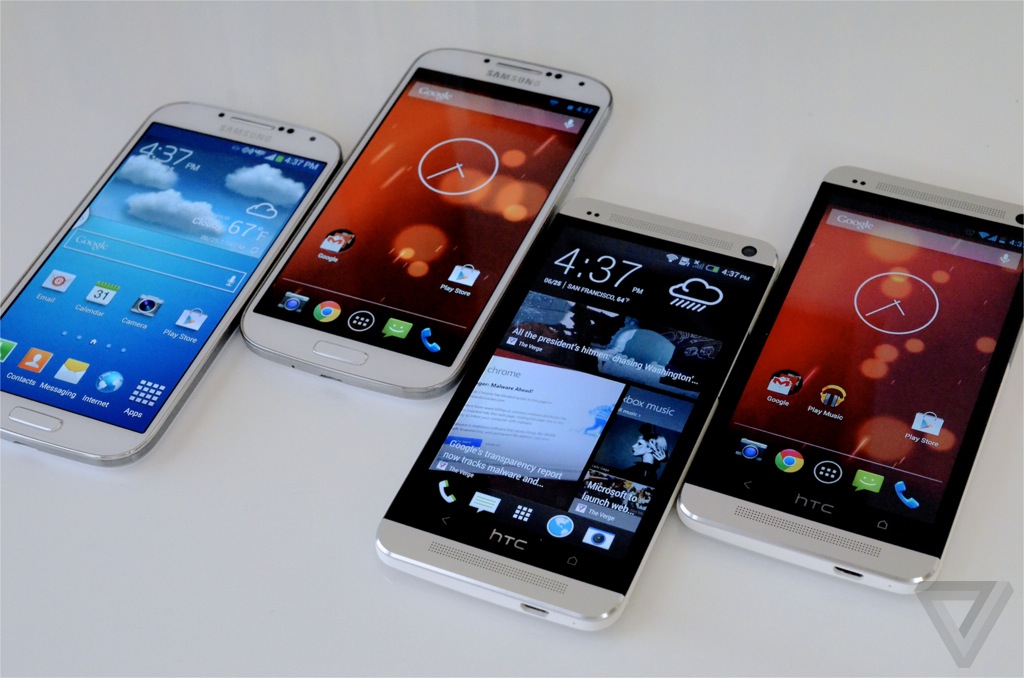
Google Play Editions Explained: Why They’re Useful Even if You Don’t Buy One
Google is now selling “Google Play Edition” devices alongside its Nexus devices on the Google Play Store website. These devices are versions of popular Android phones and tablets running different software. They seem primarily intended for Android enthusiasts and developers.
Unlike Nexus devices, these are currently only sold in the US. Outside the US, you’ll have to have a US-based friend order and ship one to you or buy from a reseller.
6 Tips for Mastering Microsoft’s Surface Pro
If you’ve got your hands on Microsoft’s Surface Pro, there are a variety of things you should know. These tricks span everything from hidden keyboard shortcuts and freeing up disk space to using the pen and connecting standard headsets.
The information in this article should apply to both the original Surface Pro and Surface Pro 2. We tested this out with a Surface Pro 2, but the devices are fairly similar aside from the internals.
Why It’s Good That Your Computer’s RAM Is Full
Is Windows, Linux, Android, or another operating system using a lot of RAM? Don’t panic! Modern operating systems use RAM as a file cache to speed things up. Assuming your computer is performing well, there’s nothing to worry about.
While it may seem counterintuitive to those of us who remember our computers always being starved for RAM, high RAM usage means your RAM is being put to good use. Empty RAM is wasted RAM.
3 Simple Ways to Improve Low Resolution Images (and Typography)
It’s not a miracle, but these helpful tips can improve the quality of an image when enlarging from a low-resolution sample. It’s surprisingly simple and quite easy. Fire up Photoshop and check it out for yourself!
At How-To Geek, we’ve written extensively about how it’s impossible to “enhance” images and reclaim detail that is lost or isn’t there to begin with. Are we changing our tune? Nope, there’s nothing magical about these tips, except for the improved results you’ll get when you improve your own low resolution images. Keep reading and give it a shot!
Why Solid-State Drives Slow Down As You Fill Them Up
The benchmarks are clear: Solid-state drives slow down as you fill them up. Fill your solid-state drive to near-capacity and its write performance will decrease dramatically. The reason why lies in the way SSDs and NAND Flash storage work.
Filling the drive to capacity is one of the things you should never do with a solid-state drive. A nearly full solid-state drive will have much slower write operations, slowing down your computer.
Windows 8.1 Will Start Encrypting Hard Drives By Default: Everything You Need to Know
Windows 8.1 will automatically encrypt the storage on modern Windows PCs. This will help protect your files in case someone steals your laptop and tries to get at them, but it has important ramifications for data recovery.
Previously, “BitLocker” was available on Professional and Enterprise editions of Windows, while “Device Encryption” was available on Windows RT and Windows Phone. Device encryption is included with all editions of Windows 8.1 — and it’s on by default.
How to Reset Your Windows Password Without an Install CD
If you’ve forgotten your Windows password and you don’t have an install CD laying around, there’s no need to worry. Not only are there half a dozen complicated ways to reset the password, you can do it easily with the Offline Windows Password editor.
Of course, if you do have a Windows CD, you can reset your password the easy way with a simple trick.
6 Start Menu Replacements for Windows 8
Want a Start menu on your Windows 8 desktop? While Microsoft no longer includes the Start button, opting instead for a click in a hidden corner and a new Start screen, there are quite a few Start menu replacements you can choose from.
You can try living without the Start button and customizing your Start screen – it’s very possible to get by without the Start button and some people seem to prefer the new interface – but you have a choice.
Many of these tools also allow you to boot directly to the desktop and hide the charms and app switcher that appear when you move your cursor to the corners of the screen, giving you a more traditional desktop experience.
14 Special Google Searches That Show Instant Answers
Google can do more than display lists of websites – Google will give you quick answers to many special searches. While Google isn’t quite as advanced as Wolfram Alpha, it has quite a few tricks up its sleeve.
We’ve also covered searching Google like a pro by learning the Google search operators – if you want to master Google, be sure to learn those.
Should You Shut Down, Sleep, or Hibernate Your Laptop?
Computers can sleep, hibernate, or shut down. Sleep allows you to quickly resume using your laptop at the cost of some electricity. Hibernate is like shutting down your computer, but you can still resume working where you left off.
There’s no right answer in all situations. Some people leave their computers running 24/7, while others shut down computers the moment they step away. Each of these options has its advantages and disadvantages.
Should I Leave My Laptop Plugged In All The Time?
Image available as wallpaper-size download here.
Today’s Question & Answer session comes to us courtesy of SuperUser—a subdivision of Stack Exchange, a community-drive grouping of Q&A web sites.
How to Optimize and Tune-Up Your PC Without Paying an Electronics Store
Stores like Best Buy will charge you $49.99 to “optimize” and “tune up” your PC — either in-store or online. These services are generally a complete waste of money — you can easily do this all yourself for free.
Electronics stores like these services because they’re very high-margin and almost pure profit. But don’t fall for it — we’ll show you how to do everything yourself without spending a dime.
QR Codes Explained: Why You See Those Square Barcodes Everywhere
QR codes are plastered on advertisements, billboards, business windows, and products. They appear to be very popular among marketers, although it’s rare to see anyone actually scanning one.
These barcodes can be captured with a smartphone camera — for example, a typical QR code may contain an URL. Scan the QR code with a mobile phone and you’ll be taken to the website the QR code specifies.
Put a Windows PC into Kiosk Mode With Assigned Access
Windows 8.1′s Assigned Access feature allows you to easily lock a Windows PC to a single application, such as a web browser. This feature makes it easy for anyone to configure Windows 8.1 devices as point-of-sale or other kiosk systems.
In the past, setting up a Windows PC in kiosk mode involved much more work, requiring the use of third-party software, group policy, or Linux distributions designed around kiosk mode.
Assigned Access is available on Windows 8.1 RT, Windows 8.1 Professional, and Windows 8.1 Enterprise. The standard edition of Windows 8.1 doesn’t support Assigned Access.
10 Things You Didn’t Know Your Web Browser Could Do Yet
Web browsers have been growing up over the past few years. Now that Internet Explorer 6’s hold on the web has been broken, browsers have been implementing a variety of cool new features that websites are taking advantage of today.
This article focuses on new web technologies that you can use on actual web pages today. Sure, some of you have no doubt heard of many of these, but the majority of people haven’t heard of all of them.
8 Ways Hardware Manufacturers Are Deceiving You
Sure, everyone involved can come up with a variety of excuses — they aren’t technically misleading customers, it’s all in the fine print, and these are the standard ways the industry operates — but hardware has been advertised in many misleading ways.
We’re not the only ones calling these marketing gimmicks misleading. Some of these tricks have even been the subject of class-action lawsuits for misleading consumers. Today we will look at 8 ways hardware manufacturers attempt to pull the metaphorical wool over the consumer’s eyes.
15 System Tools You Don’t Have To Install on Windows Anymore
Windows includes its own versions of many widely used system utilities. A variety of new utilities were added to Windows 8, but many of these utilities are available on Windows 7, too.
If the first thing you do after setting up a new Windows installation is install all your preferred utilities, this can speed things up. Better yet, these utilities are available on every Windows computer you’ll come across.
Subscribe to:
Posts (Atom)